Can an AI Front Desk Book Appointments and Route Calls?
"Can it book appointments?" is usually the first operational question a small business owner asks about an AI front desk.
The second is some version of: "Can it send the right calls to the right person?"
Both are fair. Booking and routing are where phone coverage either becomes useful—or turns into another voicemail system with better marketing.
This post answers those questions directly: what an AI front desk can do on booking and routing, what it should not pretend to do, and how to think about setup so the phone matches how your team actually works.
If you are new to the category, start with what an AI front desk actually does and does not do. For the overflow comparison, see AI receptionist vs voicemail.
What "booking" means on a phone call
Booking sounds simple. On a live call, it rarely is.
A caller might want a new customer exam, a repair estimate window, a hygiene visit, or a consult. They might be flexible on time—or need the first opening you have. They might need to know what to bring, how long it takes, or whether someone will call back to confirm.
Booking on the phone usually involves several steps:
- confirming the caller reached the right business and service type
- collecting intake details your team needs before a slot makes sense
- checking availability against rules you define
- offering options that fit your schedule and policies
- confirming the next step clearly so the caller does not wonder what happens next
An AI front desk can support that workflow when your rules are clear. It is not a substitute for judgment on messy, high-stakes, or policy-heavy situations you have not defined.
The honest frame: automation handles structured booking paths. Your team still owns exceptions, clinical or legal boundaries, and anything that requires discretion you have not scripted.
What an AI front desk can typically book or schedule
Capabilities vary by setup and integrations, but most AI front desk implementations aim to handle routine scheduling paths such as:
- New inquiry appointments with standard duration and intake fields
- Existing customer reschedules when identity and policy checks are straightforward
- Estimate or consultation windows where the goal is to reserve time, not quote the job sight unseen
- Callback commitments with a specific time block when live booking is not appropriate
- After-hours capture that holds intent until your team confirms the slot
ZFire Front Desk, powered by Ziva, is designed around your rules: which services can be offered on the phone, which hours are open, what information must be collected first, and when a human must take over.
That last part matters. Good booking automation knows when not to finalize something.
What routing means—and why it is separate from booking
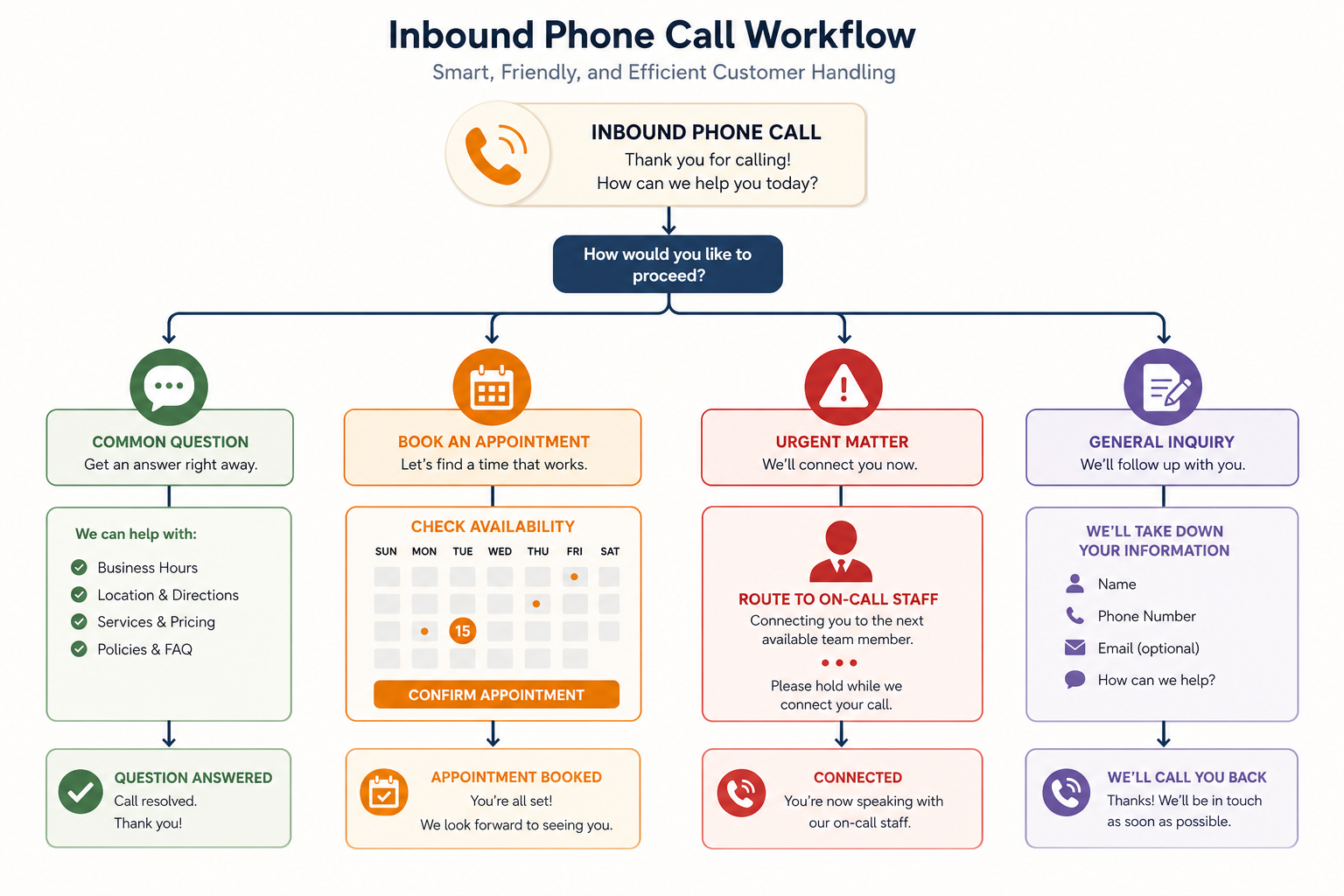
Routing is the decision about where a call goes after intake.
Not every call should become an appointment. Some should go to a technician on call. Some should go to billing. Some should go to a senior estimator. Some should stay in a queue for office staff the next morning.
Common routing paths include:
- Urgent or emergency triage based on keywords and caller answers you define
- Department or role routing—sales vs support vs dispatch
- Geographic or service-area rules
- Escalation to a live mobile or desk line with context attached
- Message capture with priority flags for next-day follow-up
Routing is where many phone systems fail even when booking works. The caller gets scheduled for the wrong thing, or the urgent call sits in a general inbox.
An AI front desk should capture enough context that the person receiving the handoff does not ask the caller to repeat everything.
For post-call discipline once routing happens, see the three things every business should do after a customer call.
Side by side: booking vs routing on the same business
Consider a residential HVAC company in peak summer.
Booking path: A caller needs a maintenance tune-up. Availability is predictable. The AI front desk confirms service area, collects address and equipment type, offers two appointment windows from your calendar rules, and sends a confirmation text. Office staff review exceptions later—not every routine call.
Routing path: A caller reports warm air and a burning smell. That is not a standard booking conversation. The AI front desk runs triage questions, flags urgency, captures address and callback number, and routes to your on-call protocol—or escalates live if your rules require it. No pretend quote. No false promise of same-day arrival unless your policy allows it.
Same phone line. Different workflows. Both need clear boundaries.
For a vertical example, see our HVAC company use case.
What AI front desks should not claim on booking or routing
Trust breaks when automation overpromises. A credible AI front desk should not:
- diagnose medical, legal, or technical problems to justify a booking decision
- guarantee pricing, timelines, or coverage outcomes your team has not approved
- override clinic, firm, or trade policies you have defined as human-only
- book complex multi-step projects without the intake your estimators require
- pretend dispatch decisions have been made when only intake was captured
If your business requires licensed judgment before anything is scheduled, the AI layer should collect and route—not clear the caller for service.
Those limits are features, not bugs. They protect callers and protect you.
How setup determines what is possible
Booking and routing are not magic features you toggle on. They reflect how your business already operates—or how you want it to operate.
Useful setup questions:
Which appointment types are truly standard? If only 30% of calls fit a clean template, automation should focus on that 30%—not on forcing every call into a slot.
What must be collected before a slot is offered? Address, insurance status, pet name, case type, photos, membership ID—the list varies by industry. Define it once; enforce it consistently.
What counts as urgent? Write triage language your team agrees on. Vague "emergency" rules create bad routing.
Who receives handoffs? Named roles, numbers, and hours beat "someone will get back to you."
What happens after hours? Booking open slots, holding requests, or routing to on-call should be an explicit choice—not a default voicemail fallback.
For workflow context, read how it works. For packaging, see pricing.
Booking + routing vs a live receptionist
This is not either-or. Many businesses use both layers.
A live receptionist handles nuance, anxious callers, and walk-ins. An AI front desk covers overflow, lunch, evenings, and the repetitive scheduling calls that interrupt field work.
For the split, see AI front desk vs live receptionist: what does what.
The goal is fewer calls dying in voicemail—and fewer unnecessary interruptions for staff who should be delivering service, not repeating hours and address questions all day.
What to measure after you turn it on
Track a short sample before and after:
- percentage of inbound calls that end with a confirmed next step
- average time to collect standard intake fields
- how often urgent calls reach the right person on first routing
- how many appointments require human rework because intake was incomplete
- callback volume from callers who still needed a person
You are not measuring "AI perfection." You are measuring whether the phone produces cleaner handoffs and fewer dropped callers.
How ZFire Front Desk approaches booking and routing
ZFire Front Desk centers on Ziva as a voice-forward front desk layer trained to your business boundaries.
That typically means:
- structured intake on every answered call
- booking paths for the appointment types you define as safe to automate
- routing rules for urgency, role, and after-hours coverage
- escalation when a call exceeds what your scripts allow
- confirmation and follow-up steps so booking and routing do not end at hang-up
Your team still owns policy, pricing, clinical or legal judgment, and anything that requires human discretion. The AI layer reduces the gap between someone called and your team knows what to do next.
Take the next step
If booking and routing are the bottlenecks on your phone line, it is worth mapping your top five call types and asking which ones deserve automation, human handling, or both.
Visit the homepage and talk to Ziva—walk through a sample booking or routing scenario in plain language.
For a tailored review of your call types and workflow, contact ZFire Media.
Learn more about ZFire Media and how we help call-heavy small businesses build phone coverage that matches real operations.