Dental Practice Use Case: Scheduling, Patient Calls, and an AI Front Desk
This is a practical use case for general dentistry and multi-provider practices that run on the phone.
It is a composite scenario, not a named office. The goal is to show how an AI front desk can support patient-facing call workflows without replacing treatment planning, clinical judgment, or the way your practice handles protected health information.
If you want the broader picture on missed calls and responsiveness, read why small businesses lose revenue when calls go unanswered.
The practice in this example
Picture a busy general dentistry office with multiple hygienists, a few provider columns, and a front desk team that is constantly toggling between check-in, checkout, and the phone.
The day is shaped by tight scheduling: recall appointments, new patient visits, restorative blocks, and the inevitable add-ons when someone needs to squeeze in.
Meanwhile the phones still ring: insurance and billing questions, appointment changes, new patient inquiries, and callers describing pain, swelling, or a broken tooth.
That combination is normal. It is also where small failures become expensive: missed rings, vague voicemail, and patients who choose the next office that sounds organized.
For a related healthcare-adjacent write-up with similar boundaries, see our chiropractic practice use case.

What callers usually want
Most calls fall into predictable buckets.
Some callers need scheduling: cleanings, new patient exams, follow-up treatment, or a specific provider request.
Some callers need operational clarity: hours, location, parking, forms, and what to bring.
Some callers have billing or insurance questions that may need a trained coordinator, depending on your policy.
Some callers use urgent language: pain, trauma, swelling, bleeding, or symptoms that may require a triage mindset and a fast path to a clinician or emergency guidance, based on your protocols.
Where the phone breaks in dental practices
In this scenario, the office struggles with a few recurring problems.
Calls go unanswered during morning rush and lunch transitions.
Voicemail creates phone tag, especially for new patients who are still shopping practices.
Front desk multitasking makes the in-office experience and the phone experience compete for attention.
After hours, callers still need a clear next step. For more on that pattern, read after-hours call handling for small business.
What a strong front line sounds like in a dental context
Patients often want reassurance: they reached the right office, their request is understood, and there is a predictable next step.
That is not the same as diagnosing over the phone.
Good intake is structured: who is calling, what they need, how soon it matters, and what information your team requires to act.
If you are newer to the category itself, read what an AI front desk actually does and does not do.
How ZFire Front Desk fits a dental workflow
ZFire Front Desk centers on Ziva as a voice-forward assistant that can answer common questions, capture structured details, and route callers based on rules you define.
In a dental context, that might include:
- helping callers understand basic scheduling paths and what information you need for a new patient visit
- capturing name, callback number, reason for visit, and urgency language in consistent fields
- routing high-concern language toward a staff escalation path you choose
- supporting after-hours coverage so fewer calls end on a generic message with no next step
The exact setup depends on your policies, your practice management tools, and how you want clinical concerns handled.
What it should not pretend to do
An AI front desk should not act like a dentist or hygienist.
It should not diagnose conditions, recommend treatment, or provide individualized medical advice.
It should not encourage detailed clinical storytelling beyond what your practice wants collected on a phone line, and it should not replace your compliance posture or your documented workflows for PHI.
Sensitive situations belong with trained staff or licensed providers, following your practice protocols.
Clear boundaries protect patients and protect the office.
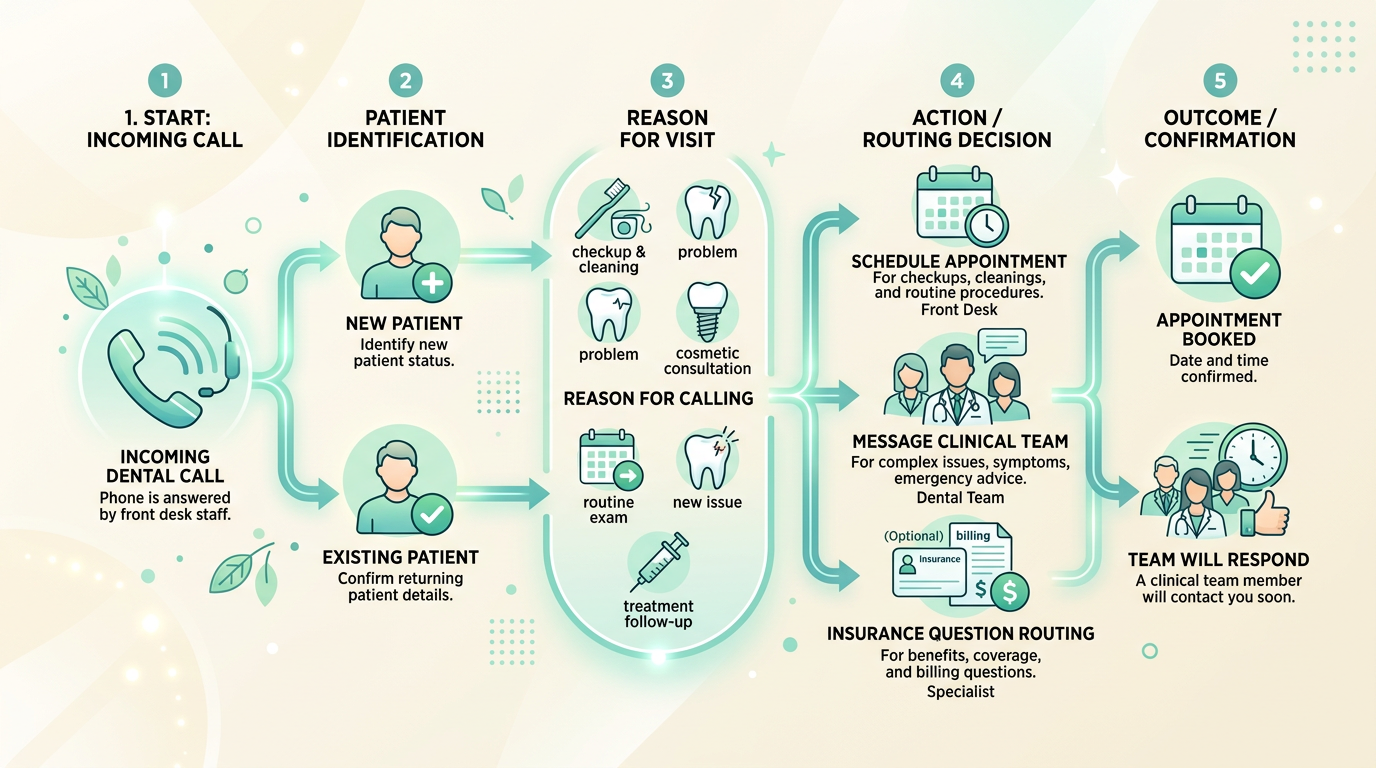
Escalation that matches real clinical risk
The best implementations make escalation obvious and repeatable.
If a caller describes severe swelling, trouble breathing, significant trauma, or other red-flag language, your policy might require immediate staff involvement or direction to emergency care when appropriate.
For routine scheduling and education questions, the win is often cleaner capture and fewer dropped threads between "someone called" and "the office can act."
How to evaluate fit for your practice
Useful questions include:
- what share of new patient revenue is lost to slow response
- how often voicemail delays treatment acceptance or scheduling
- what facts your coordinators need on every intake call
- which questions must always reach a human quickly
For workflow detail, read how it works. For packaging, see pricing.
Take the next step
If you want to explore whether ZFire Front Desk could match your call patterns and policies, contact ZFire Media.
If you want to hear how Ziva sounds first, visit the homepage and talk to Ziva.
Learn more about ZFire Media and how we work with call-heavy small businesses.